
FUJIFILM Apeos C6570
The Fujifilm Apeos C6570 prints up to 65 pages per minute on letter paper in black or color. Fujifilm lists 32 ppm for A3 copying. Compare the B2-PC and higher-capacity C2-PC feeder configurations.
Price an installed configuration
Request a U.S. equipment and service price for the Apeos C6570 configuration you need.
Ask for a price that includes the trays and finishing hardware you need, delivery, setup and local service.
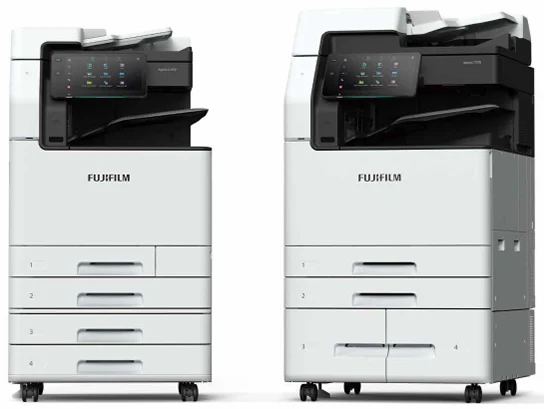

Check the full configuration on the quote
Match the model suffix, document feeder and trays in the dealer’s quote. Fujifilm lists EPEAT Gold configurations sold in the U.S. Check the listed configurations.
Print and scan specifications
- Letter print and copy speed
- Up to 65 ppm black or color
- Legal and A3 copy speeds
- 38 ppm legal and 32 ppm A3
- Print resolution
- Up to 1,200 × 2,400 dpi
- Document feeder
- 130-sheet B2-PC or 250-sheet C2-PC by configuration
- Two-sided scan rate
- Up to 160 ipm with B2-PC or 270 ipm with C2-PC at 200 dpi to folder
- Paper and media
- Up to 12 × 18 in supported trays, up to 12 × 19 through the bypass. Check duplex and finisher limits for the stock you use.
- Installation power
- 110–127 V. The U.S. brochure lists two connections, 12 A + 7 A. Confirm with the installer.
What to confirm with the dealer
For frequent long jobs. Have the installer confirm both power connections and the floor plan. Ask for the feeder part number, tray and finisher configuration, included toner and on-site response for the same ZIP and print volume.
Compare all six Apeos C7070-series models
For a lease, request the term, end-of-lease terms and service charges for the same configuration and print volume. Use the copier quote checklist.
Can I send scans from the panel to Paige?
Try a two-sided batch to an approved network folder, then use Paige Folder Monitor to send it to a capture job. For a panel installation, confirm Apeos Connect, Embedded Web Browser V6, and the exact device and firmware during a live demo.
Compare routes to PaigeCheck native panel requirements
Explore Paige from Ademero, the company that operates CopierGuide.
Compare nearby Apeos models
- Apeos C7070 The fastest letter and A3 rates in this family. Compare the configured feeder, output and installation.
- Apeos C5570 For regular multi-set printing and two-sided scanning. Confirm feeder and finisher together.