
ISO-02 color copier test pattern
Print the same chart on each machine. Compare fine text, gray steps, and color bands, then see whether a defect first appears when you print or when you copy.
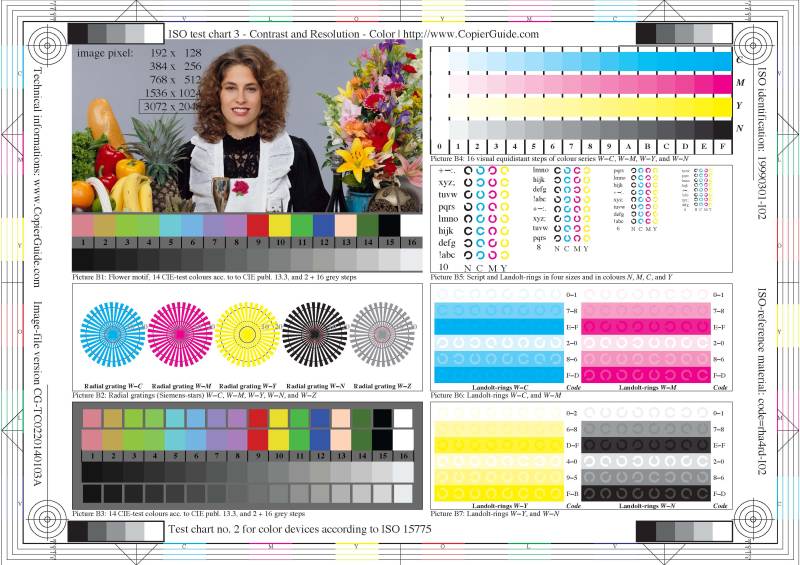
Print, copy from the glass, then copy from the feeder
- Print the downloaded JPG from a workstation. Use the same paper, orientation, scale and color mode for each machine. Keep the entire border visible. Mark this sheet “direct print.” Choose the actual driver and settings your office will use.
- Copy the direct print from the flatbed. Set the same paper and copy scale for both copy runs. Mark the result “glass.” Use the direct print as the original each time to keep the comparison consistent.
- Copy the same original through the feeder. Mark it “feeder.” Put the three sheets in order. Compare the first sheet with the downloaded file and the two copies with the first sheet. For two-sided work, run the separate duplex scan test.
If a line appears only on the feeder copy, check whether it also appears in a saved feeder scan. Use the print and scan streak guide to narrow it down. If the line is already on the direct print, try a second clean file or a built-in test page. HP’s scanner isolation procedure illustrates the flatbed-versus-feeder check.
What to look for on the sheets
- Fine text and map lines
- Compare small lettering and the thinnest dark lines. See whether they stay legible or fill in on the copy. Compare the same part of the image side by side.
- Gray steps and shadows
- Look at the gray strips and the dark areas in the photograph. Check whether neighboring tones stay distinct. Compare under the same lighting on the same stock.
- Color patches and gradients
- Look for abrupt bands, a missing color, or an obvious color cast. Repeat the print with the same color mode and paper settings before comparing another machine.
- Edges and repeated marks
- Compare the chart border and the same point on each sheet. Note any clipped edge, colored fringe, or stripe. Save the direct print and both copies so the dealer can reproduce the result.
Use this 800-pixel JPG for a visual comparison at your office. For a formal evaluation of color-copy reproduction, use the printed charts and procedure specified in ISO/IEC 15775:2022.
Ask for sample output from the copier you’re buying
Have the dealer run these three checks on the quoted machine using your paper and tray setup. Keep the samples alongside the quote so you can repeat the checks at installation.